Author: Valeriu Paloş

  • Fully dynamic JSON handling in Scala

    For some time now I (badly) wanted to be able to work with JSON structures in Scala just as easily as in JavaScript (though even in JS you need some wizardry to be able to to this elegantly).

    I don’t particularly like Json4s since I feel that it’s overly complex (no, I don’t want to extract data into case classes using for-combinators), documentation is difficult to grasp and use (especially for edge cases) and Jackson and various other libraries are mainly oriented towards the Java-style JSON handling which basically means mapping to/from POJOs or similar.

    What I wanted was to be able to navigate and/or alter a JSON structure directly using simple dot/call notations (e.g. json.server.hosts(2).name = "storage.mysite.com") and have a cheat-sheet-like documentation which whould (always) be simple and sufficient.

    So here is my first swing at this using pure Scala parser combinators and other Scala-specific magic like Dynamics. The only dependencies (beside the Scala library) are the Scala parser combinators and Apache commons lang (I need this for string-escaping, especially Unicode stuff). License is Apache 2.0.

    Disclaimer: This library is a first serious attempt at this problem and thus it is not optimized for high parsing speed, or low memory footprint; it does, however, deliver on ease of working with the JSON structure, which is the main goal. A second release is in the works which tries to optimize for better parsing speed and lower memory consumption.

    Furthermore, I had no time yet to write a complete reference (i.e. the mentioned cheat-sheet), however the 120+ unit tests should be enough to get you going for now.

    Check-out the sources here!

    Compiling

    Normally you would just copy the com/vpalos/Json.scala file inside your source tree and ensure you bring the dependencies in your project (i.e. see build.gradle), but if you want to build a Jar or run the tests just do this (you should be connected to the Internet for all tests to pass):

    git clone "https://github.com/vpalos/com.vpalos.Json.git"
    cd "com.vpalos.Json"
    ./gradlew test
    # ...or...
    ./gradlew build
    

    Teaser

    Please visit the unit tests for a more complete overview! However, here are thre one-liners that should make you interested:

    """{"fox": {"quick": true, "purple": false}}""".toJson.fox.quick.asBoolean // true
    
    """{"points": [12.3, 991.8, 4.009, 1]}""".toJson.points(-2) // 4.009
    
    Json.parse("{}").some.missing.field.isDefined // false, no exceptions thrown
    

    Enjoy!
  • Universal getter for plain JS objects.

    Many times in JavaScript we have to reach deep into objects to access fields that could possibly not be there at all; for example let’s assume I have a JS object called options into which I’ve just read an entire JSON configuration file. Trying to access a field like options.application.cache.enable directly will potentially fail (e.g. when any of the intermediate levels is missing)…

    if (options.application.cache.enable) {
        // do stuff
    }
    

    …therefore this kind of work will usually involve some kind of testing for the existence of each level, so as to gracefully handle any misbehaving data. Also, many times I’ve seen the following approach used in these scenarios which is quite bad for anything more than a single depth level:

    if (options && options.application && ...) {
        // do stuff
    }
    

    So, just as a little helper, here is a small method that may prove to be quite handy when having to deal with data whose structure we’re not certain of (here’s a proper Gist entry).
    (more…)

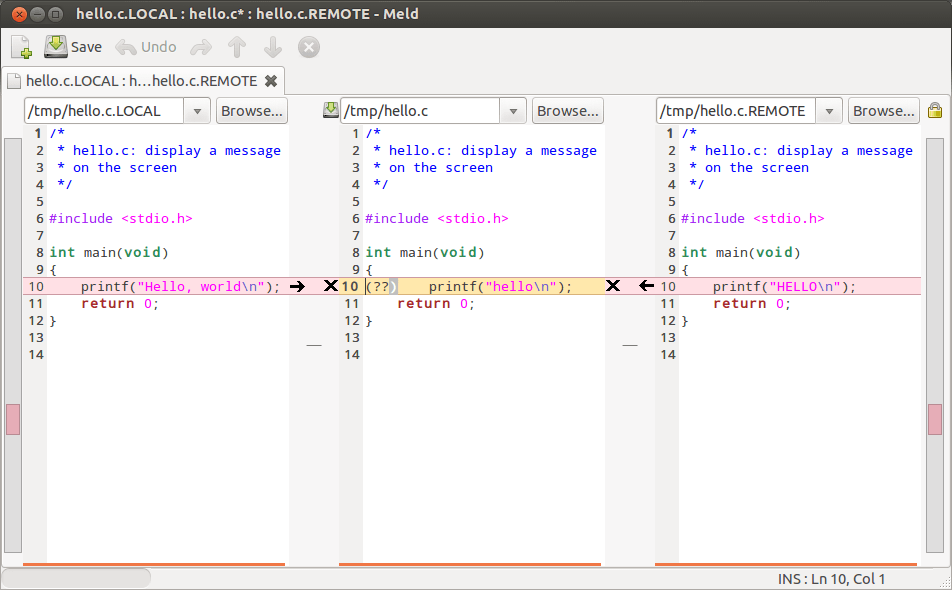
  • Visualizing Git diffs in Meld.

    Here’s a quick way of configuring your (Linux-based) Git installation to use the excellent Meld program by default for displaying/editing the outputs of the git diff and git merge commands (e.g. git diff «filename»).

    Install Meld

    …if you haven’t already (note that we assume Git to be present):

    # on Debian-based distros (ymmv)
    sudo apt-get install meld
    

    Viewing/editing file diffs via Meld

    Configure Git to use Meld as the default tool for git diff:

    git config --global diff.tool meld
    git config --global difftool.prompt false
    

    Now, rather than the classic git diff, simply use:

    git difftool
    

    Resolving merge conflicts via Meld

    Basically do the same for the git mergetool command:

    git config --global merge.tool meld
    git config --global mergetool.prompt false
    

    And then, instead of git merge, simply use:

    git mergetool
    

    …in the conflicting areas of your Git project.

    Full directory comparison

    Git supports full directory comparison via the following command:

    git diff --no-index «folder-inside-git-project» «folder-to-compare-against»
    

    While both useful and powerful, this command can be quite difficult to use, especially is you have a large tree structure. However, it just so happens that this is another aspect where Meld shines. Just run:

    meld «folder A» «folder B»
    

    And you will be able to visualize and edit the entire set off differences of both folder structures (including files).

    Enjoy!

    Notes:

    • The *tool.prompt false bits are needed to prevent the prompting of the user on each command invocation (which is the default behaviour).
    • The full directory comparison mode supported by Meld is obviously available for any folders, not just those inside Git projects.
    • I’m using Ubuntu 12.10, your setup may require different configuration options (although if you have a decently recent Git you should be fine).
  • Luca

    Again, I have to break the tradition to only post programming-related articles. This is because on the September 22nd 2012, this guy said hello. I know I was a bit late in letting him say say “Hi!” on the web too, but daddy’s been really busy and he forgot :(. But have no fear sonny-boy, here’s your shot…

  • Quickly filtering large lists of texts.

    Recently, I had to make a mock-up of a filtering function (something I need for a project I work on) so I can show-case it around. And since this mock-up seems to impress some people, I decided to share this function with everybody so others may enjoy the “loot” :).

    Briefing

    The function (i.e. filter()) basically receives a query, a large list of text items and (optionally) some options. It then proceeds to filter that list based on the query and returns an array with the index numbers of the matching items and (optionally) an array with the marked texts of the matching items (i.e. highlighted captures). The documentation comment should provide all the needed insight on this thing.

    Demo

    Here you can play with the mocked-up demo (works on a list of ~23000 items).

    Source

    Since I usually store these short snippets of code among my gists, you can find this function here. You should always check the gist for the most up-to-date code!

    /**
     * Demo: http://vpalos.com/sandbox/filter.js
     *
     * A generic search algorithm designed for filtering (very) large lists of strings; when an input string
     * contains all the parts (words or characters; whitespace is ignored) of the query, spread-out over the text
     * then the string is considered to be a match. It works with the way internet browsers (e.g. Firefox, Google
     * Chrome) filter address-bar suggestions on user input. It is also quite fast; on my i7 laptop, filtering
     *     1) a list of ~23000 items takes around 50ms (yes, milliseconds!);
     *     2) a list of ~1 million text items took under 1 second.
     * It works both in NodeJS as well as in browser environments (so far I only tested FF and GC).
     *
     * It has two functioning modes:
     * 1) word-mode: each (whitespace-separated) word in the input query must be found **whole** in the text:
     *     e.g. "foo bar" will match "123foo456bar789" but not "f oo ba r";
     * 2) charater-mode: the input query is matched per-character (whitespace is completely ignored):
     *     e.g. "foo bar" will match "f o o b a r" and even "-f.oo-ba.r-".
     *
     * Options (values below are the defaults):
     * {
     *     "case": false,               // true: case-sensitive
     *                                  // false: case-insensitive
     *
     *     "mark": true,                // true: returns item numbers + matches with highlighted captures
     *                                  // false: returns item numbers only
     *
     *     "prefix": "<strong>",        // highlight prefix string
     *     "suffix": "</strong>",       // highlight suffix string
     *
     *     "word": true,                // true: whole-word mode
     *                                  // false: character mode
     *
     *     "limit": 0                   // limit results to this amount
     *                                  // 0 means return the whole result (unlimited)
     * }
     *
     * @param {string} query The search query, consisting of space-separated chunks of characters.
     * @param {string|array} items A string or an array of strings to filter; if a string is given then it is
     *                             first split into an array of individual lines of text and then filtered (note
     *                             that).
     * @param {string} prefix String which will come before every highlighted substring (i.e. capture).
     * @param {string} suffix String which will come after every highlighted substring (i.e. capture).
     * @return {object} Returns the following object with matched items information:
     *                  {
     *                      "items": [...],     // array of matched item-numbers
     *                      "marks": [...]      // if mark == true, array of matches with highlighted captures
     *                  }
     */
    function filter(query, items, options) {
    
        // option producer
        function option(name, value) {
            options = options || {};
            return typeof(options[name]) !== 'undefined' ? options[name] : value;
        }
    
        // prepare options
        var o_case   = option("case",   false);
        var o_mark   = option("mark",   true);
        var o_prefix = option("prefix", "<strong>");
        var o_suffix = option("suffix", "</strong>");
        var o_word   = option("word",   true);
        var o_limit  = option("limit",  0);
    
        // prepare query
        query  = o_case ? query : query.toLowerCase();
        query  = query.replace(/\s+/g, o_word ? ' ' : '');
        query  = query.replace(/(^\s+|\s+$)/g, '');
        query  = query.split(o_word ? ' ' : '');
        var ql = query.length;
    
        // prepare items
        if (typeof(items) === "string") {
            items = items.split('\n');
        }
    
        // prepare results
        var matches = {
            items: [],
            marks: []
        };
    
        // search
        for (var ii = 0, il = items.length; ii < il; ii++) {
    
            // prepare text
            var text = o_case ? items[ii] : items[ii].toLowerCase();
            var mark = "";
    
            // traverse
            var ti = 0;
            var wi = 0;
            var wl = 0;
            for (var qi = 0; qi < ql; qi++) {
                wl = query[qi].length;
                wi = text.indexOf(query[qi], ti);
                if (wi === -1) {
                    break;
                }
                if (o_mark) {
                    if (wi > 0) {
                        mark += items[ii].slice(ti, wi);
                    }
                    mark += o_prefix + items[ii].slice(wi, wi + wl) + o_suffix;
                }
                ti = wi + wl;
            }
    
            // capture
            if (qi == ql) {
                if (o_mark) {
                    mark += items[ii].slice(ti);
                    matches.marks.push(mark);
                }
                if (matches.items.push(ii) === o_limit && o_limit) {
                    break;
                }
            }
        }
    
        // ready
        return matches;
    }
    

    [Update] Thanks to vladpalos for pointing-out some flaws in my initial code which, in the end, led me to simply using String.indexOf() for finding sub-matches.

    So…

    Let me know how this can be improved!

  • JS classes for the masses.

    Following on an older post of mine, I decided to write a new article about an(other) implementation of OOP Classes in JavaScript. This is something that brings a lot of value from very few lines of code and I want to share it with everyone and see how it can be improved.

    First let’s see the code (you should check here for the latest version) and then I’ll try and explain the relevant benefits/features but jump straight to the goodies if you like, knock yourself out! 🙂

    /**
     * Class.js: A class factory.
     */
    function Class(members) {
    
        // setup proxy
        var Proxy = function() {};
        Proxy.prototype = (members.base || Class).prototype;
    
        // setup constructor
        members.init = members.init || function() {
            if (Proxy.prototype.hasOwnProperty("init")) {
                Proxy.prototype.init.apply(this, arguments);
            }
        };
        var Shell = members.init;
    
        // setup inheritance
        Shell.prototype = new Proxy();
        Shell.prototype.base = Proxy.prototype;
    
        // setup identity
        Shell.prototype.constructor = Shell;
    
        // setup augmentation
        Shell.grow = function(items) {
            for (var item in items) {
                if (!Shell.prototype.hasOwnProperty(item)) {
                    Shell.prototype[item] = items[item];
                }
            }
            return Shell;
        };
    
        // attach members and return the new class
        return Shell.grow(members);
    }
    

    Observations

    Each Class points to (via .prototype) a corresponding Proxy object that holds the class’s member fields. In turn, this Proxy points to (via .prototype) the Proxy of the inherited class (i.e. the super-Class) and so on. So, each Class points to its own Proxy which points to the ancestor Proxy and so on, until the top level ancestor is reached. (more…)

  • Loomiere 2.0.1-beta finally out!

    All right! I finally got around to releasing this code to the public. I won’t say much now (since I’m tired) but I will say that this software has been functioning in production environment for over 1 year and a half serving all the video content available on the romanian website http://peteava.ro (about 800 TB of data each month out of 14 servers).

    Some (old) statistics showing it’s power can be found here.

    Source code: https://github.com/valeriupalos/loomiere.

    Warning:
    Any software downloaded from this website is *never* to be associated in any form with pornographic or erotic content! I.E. “Loomiere” must *never* be used to stream pornographic or erotic videos! There are plenty alternatives if you can’t help it.

  • Lua-TTyrant: a TokyoTyrant binding for Lua.

    Some time ago I started a small project to implement a C-to-Lua binding of the TokyoTyrant library, called “lua-ttyrant“. A few days ago, while working with a script that was actually using it, I decided to polish it up, finish it and eventually submit it to be included in the LuaRocks repositories. Given the fact that the “rock” was just accepted by the LuaRocks team, I thought a new post was in order.

    Files

    The lua-ttyrant source code can be found here (among my github repos).
    The lua-ttyrant rockspec can be found here (among all the public Lua rocks).

    Prerequisites

    • TokyoTyant library and headers.
    • LuaRocks.

    Prerequisites on Debian/Ubuntu distros:

    sudo apt-get install libtokyotyrant-dev
    

    Installation

    sudo luarocks install lua-ttyrant
    

    Status

    The binding is in beta for now. Please contribute a ticket if you find anything wrong with it. For anything else please see the doc/DETAILS file. Enjoy! 🙂

  • A simple(r) approach for class-based OOP in JavaScript.

    Like others before me, I found JavaScript’s prototype-based OOP support – while very powerful – quite cumbersome in some situations where I needed a certain structure or hierarchy of objects, situations in which one quickly comes to the conclusion that the best answer would be the concept of a Class.

    However, while I am well aware that the web is filled with various implementations of classical (i.e. class-based) object orientation in JavaScript, I can not help the feeling that they are over-engineered and over-complicated without need, quite often attempting to provide more functionality than is actually necessary. In short, I don’t feel they’re “classical” at all.

    This is why I started working on my own implementation of classical OOP  in JavaScript, which is shown below. Currently this is only a proposal, although I already started using it in one of my projects. Anyway, let’s look at it first then I’ll try and explain how it works.

    The Code

    /** Class factory. */
    function Class(members) {
    
        // proxy constructor
        var Proxy = function() {
            for (var item in members) {
                this[item] = members[item];
            }
        };
    
        // proxy inheritance
        Proxy.prototype = (members.base || Class).prototype;
    
        // class constructor
        var Build = members.init || function() {};
    
        // class inheritance
        Build.prototype = new Proxy();
        Build.prototype.base = Proxy.prototype;
        Build.prototype.constructor = Build;
    
        // ready
        return Build;
    }

    That is all, and this little function can have a whole world of nifty consequences like deep inheritance or access to the super-class via this.base (and others). But here is what happens: the basic principle at work here is the Proxy object, which essentially, contains all the members of our new class (the ones that are passed to the Class factory function as the members parameter). (more…)

  • Command-line option parser in JavaScript.

    Here’s a small but very effective command-line option parser written in JavaScript (uses NodeJs). You can get the up-to-date source code at http://gist.github.com/982499.

    I wrote this because I needed it for a project and I did not think it was worth it to install some npm package just for this. The comment should explain most things you will need but ask me if you don’t understand something. Note that this code is not well tested (yet!) since I just wrote it this morning so post a comment when you find a bug.

    Supports:

    • Short and long options (i.e. ‘-t|--test‘).
    • Option parameters (i.e. ‘-f /etc/resolv.conf‘).
    • Mandatory options.
    • Implicit help option.
    • Option callback functions.
    • Cumulated short options (i.e. ‘-ab‘).
    • Repeatable options (i.e. ‘--add value1 --add value2‘).
    • Non-option arguments.

    Notes (extracted from the comments):

    • Parser is case-sensitive.
    • The ‘-h|–help’ option is provided implicitly.
    • Successfully parsed options will be available as fields in the “options” object.
    • Non-option arguments found will be available in order in the “arguments” array.
    • Options and their parameters must be separated by space.
    • Either one of «short» or «long» must always be provided.
    • The «callback» function is optional and is invoked each time the option is encountered.
    • Cumulated short options are supported (i.e. ‘-tv‘).
    • If an error occurs, the process is halted and the help message is shown.
    • Options with the “multiple” attribute will be cumulated into arrays (even if found only once).
    • The parser does *not* test for duplicate definitions in the schema array.

    See the code for everything else you need to use it (i.e. a sample schema definition). I will not waste any more time talking about it; if you like it, paste it at the top of your NodeJS script and start playing with it, e.g.:

    $ node options.js -tf /some/file.txt foo bar

    Also, please tell me about any improvements or fixes you produce. Thanks and… enjoy! 🙂